
Main features
📥 Acquisition Multi-Scanner Vulnerability
Supported Scanners Natively:
Commercial Scanners:
- Tenable Nessus Professional/Expert: API v2 integration, automatic import scan results
- Qualys VMDR: API integration with asset correlation
- Rapid7 Nexpose/InsightVM: Real-time import via webhook
- Acunetix: Web vulnerability import with severity mapping
- Burp Suite Enterprise: REST API integration for web app scanning
Open Source Scanners:
- OpenVAS/Greenbone: XML import with CVE enrichment
- OWASP ZAP: JSON/XML import, CI/CD integration
- Nikto: Import scanner web server
- Nmap + NSE scripts: Network vulnerability detection
- Trivy: Container/IaC vulnerability scanning (roadmap v2.0)
Cloud-Native Scanners (roadmap v2.5):
- AWS Inspector
- Azure Security Center
- Google Cloud Security Command Center
Import Methods:
- REST API: Real-time scanner push (webhook)
- Upload file: Manual/scheduled upload XML/JSON/CSV
- Scheduled pull: Sentinel Core downloads periodically from API scanners
- Import Email: Forward scan report via email → automatic parking
Format Support:
- Nessus XML (.nessus)
- XML OpenVAS
- XML Qualys
- JSON generic (schema-flexible)
- CSV (with column mapping)
- SARIF (Static Analysis Results Interchange Format)
Intelligent Deduplication:
- Same CVE detected by multiple scanners → single entry
- Asset matching via IP, hostname, MAC address, cloud instant ID
- Version-aware: CVE on Apache 2.4.41 ≠ CVE on Apache 2.4.50
- Temporary deduplication: Re-scan does not create duplicates if vulnerabilities already exist
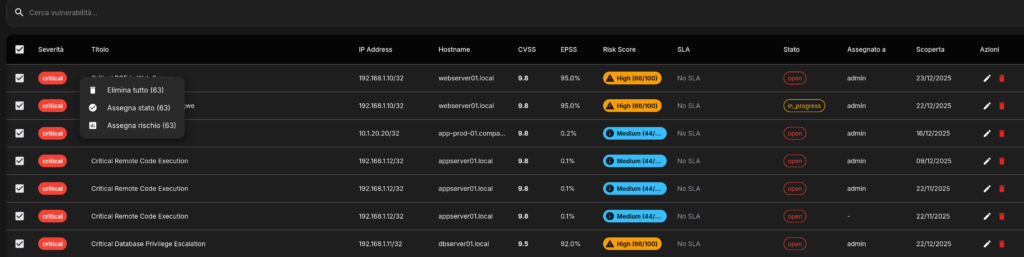
🏷️ Cataloging and Automatic Enrichment
Vulnerability Metadata:
CVSS (Common Vulnerability Scoring System):
- CVSS v3.1 scoring (preferred)
- CVSS v2 legacy support
- Base score (intrinsic severity)
- Temporary score (exploit availability, remediation level)
- Environmental score (asset criticality, collateral damage)
- Vector string parsing (AV:N/AC:L/PR:N/IU:N/S:U/C:H/I:H/A: H)
EPSS (Exploit Prediction Score System):
- Daily updates from FIRST. org
- Probability 0-100% exploit in the next 30 days
- Percentage ranking (this CVE is more exploitable than X% of the others)
- Historical trending (EPSS score evolution over time)
CVE Database Relationship:
- NVD (National Vulnerability Database) enrichment
- CVE description, references, CWE mapping
- Published date, last modified date
- Vendor advisories links (Microsoft, RedHat, Debian, etc.)
CWE (Common Weakness Enumeration):
- Weakness category (e.g. CWE-79: XSS, CWE-89: SQL Injection)
- OWASP Top 10 mapping
- SANS Top 25 mapping
- Attack pattern references (CAPEC)
Exploit Intelligence:
- Metasploit modules availability
- ExploitDB references
- Public PoC (Proof of Concept) availability
- Active exploitation in the wild (from threat intel feeds)
- Ransomware gang targeting (from CTI reports)
Asset Context:
- Operating System + version
- Installed software inventory
- Service/port exposure (internal vs external)
- Geographic location (datacenter, cloud region)
- Business unit ownership
- Asset criticity (from CMDB integration)
- Environment (production, staging, development)
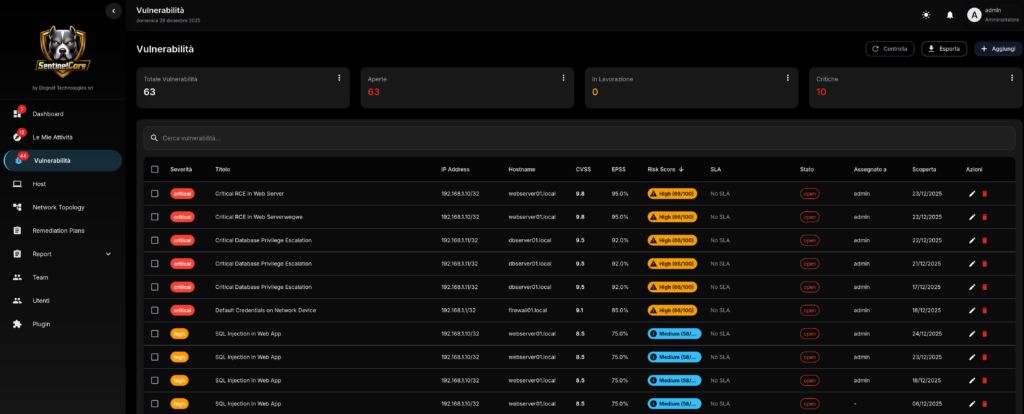
🎯 Intelligent Prioritisation
Risk Scoring Algorithm:
Risk Score (0-100) =
  (CVSS Base × 0.30) +
  (EPSS Score × 0.25) +
  (Business Impact × 0.25) +
  (Asset Exposure × 0.15) +
  (Exploit Availability × 0.05)
Detailed factors:
1. CVSS Base (0-10 → 0-30 points):
- Critical (9.0-10.0): 30 points
- High (7.0-8.9): 22 points
- Medium (4.0-6.9): 15 points
- Low (0.1-3.9): 5 points
2. EPSS Score (0-100% → 0-25 points):
- EPSS >50% (high probability): 25 points
- EPSS 20-50%: 18 points
- EPSS 5-20%: 10 points
- EPSS <5%: 3 punti
3. Business Impact (0-25 points):
- Asset criticism:
- Critical (payment processing, auth): 25 points
- High (web/API production): 18 points
- Medium (internal tools): 10 points
- Low (dev/test): 3 points
- Date sensitivity: +5 points if PII/PCI/PHI
- Revenue impact: +5 points if downtime costs >€10k/hour
4. Asset Exposure (0-15 points):
- Internet-facing: 15 points
- DMZ (limited exposure): 10 points
- Internal network: 5 points
- Isolated/air-gapped: 0 points
- Port exposure: +3 points if critical (RDP, Telnet, SMB)
5. Exploit Availability (0-5 points):
- Public exploit + active campaigns: 5 points
- Public exploit (Metasploit, ExploitDB): 4 points
- PoC available: 3 points
- Exploit theoretical: 1 point
- No exploit info: 0 points
Risk Tiers:
- Critical Risk (80-100): Remediate within 24h (P1)
- High Risk (60-79): Remediate within 7 days (P2)
- Medium Risk (40-59): Remediate within 30 days (P3)
- Low Risk (20-39): Remediate within 90 days (P4)
- Informational (<20): Monitor, no ALS
Priorityization Overrides:
Manual Override:
- Security team can force priority (e.g. compliance requirement)
- Requires justice + approval (audit trail)
Automatic Overrides:
- Zero-day: Self-escalate to Critical independently of CVSS
- Targeted Ransomware: CVE in active ransomware campaigns → Critical
- Compliance sent: PCI-DSS critical findings → force P1
- Exploit confirmed (from Intellidog if integrated): +20 points Risk Score
Remediation Effort Estimate:
- Trivial (patch available, reboot): 1-2 hours
- Easy (patch + config change): 4-8 hours
- Medium (patch + testing + coordination): 1-3 days
- Hard (workaround, vendor not responsive): 1-2 weeks
- Very Hard (architectural change, no fix available): >1 month
Algorithm considers effort vs risk to suggest optimal sequencing.
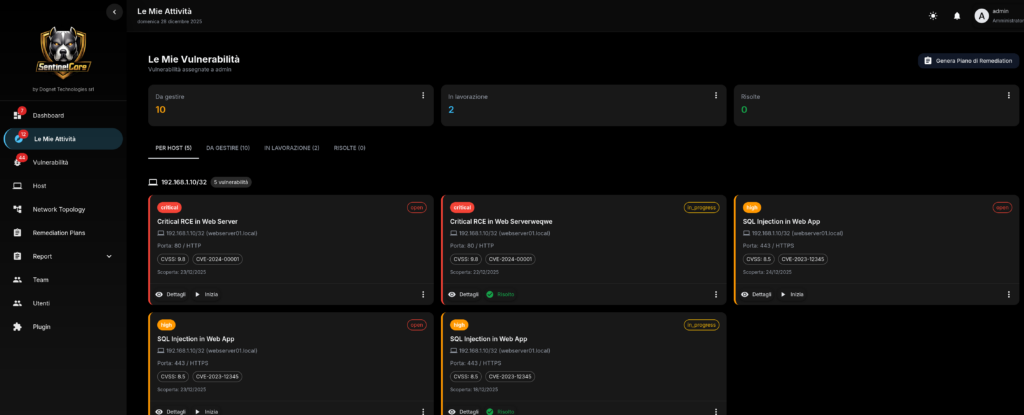
👥 Workflow and Team Orchestration
Team Management:
Structure Team:
- Teams: Logical groups (e.g. "Infrastructure Team", "Web Team", "Database Team")
- Members: Users assigned to teams with roles
- Roles: Team Leader, Senior Engineer, Engineer, Junior
- Skills: Tags skills (Linux, Windows, AWS, Docker, Apache, etc.)
- Capacity: Maximum workload (e.g. max 10 simultaneous tasks)
Assignment Rules:
Rule-Based Assignment:
yaml
rules:
  - name: "Web vulnerabilities to Web Team"
    condition: asset.tags contains "web" AND vuln.category == "web"
    team: "Web Team"
    priority: high

  - name: "Database vulns to DB Team"
    condition: asset.software contains "mysql|postgresql|mongodb"
    team: "Database Team"

  - name: "Critical always to senior"
    condition: vuln.risk_score >= 80
    team_member_role: "Senior Engineer"
Load Balancing:
- Consider current workload of each team member
- Fairly distribute between members with skill match
- Avoid overload: if saturated team → escalation to manager
Smart Assignment:
- Historical performance: Assign to those who have better track records about that type of vuln
- Availability: Respect calendar integration (vacations, training)
- Timezone: Assign timezone recital for optimal time response
Lifecycle Task:
Task States:
- Open: Vulnerability detected, not yet assigned
- Assigned: Assigned to team/person, queued
- In Progress: Team member took charge
- Pending Approval: Fix proposed, requires approval (for prod changes)
- Approved: Approval obtained, deployment schedule
- Remediated: Fix applied, pending verification
- Verified: Re-scan confirms vulnerability resolved
- Closed: Task completed
- Rejected: Not real vulnerabilities (positive false)
- Risk Accepted: Management accepts risk (with justice)
SLA Tracking:
- Each task has priority-based deadline
- Real-time countdown dashboard
- Alert escalation when ALS break imminent:
- 75% SLA elapsed → reminder to team member
- 90% SLA elapsed → escalation to team leader
- 100% SLA break → escalation to manager + incident report
Collaboration Features:
- Comments: Team discussed thread on each task
- @mentions: Colleague Notification by Input
- File attachments: PoC, config files, screenshots
- Activity log: Who did what when (audit trail)
Workflows approval:
Change Approval (for prod):
- Engineer proposes fix → create Change Request
- Team Leader reviews → technical approval
- Change Advisory Board (if critical asset) → business approval
- Deployment window scheduling
- Post-deployment verification
Risk Acceptance:
- If unpatched vulnerability (legacy system)
- Requirements: Justice, mitigating controls, expiration date
- Approval: ISO or equivalent
- Regular review: Every 90 days
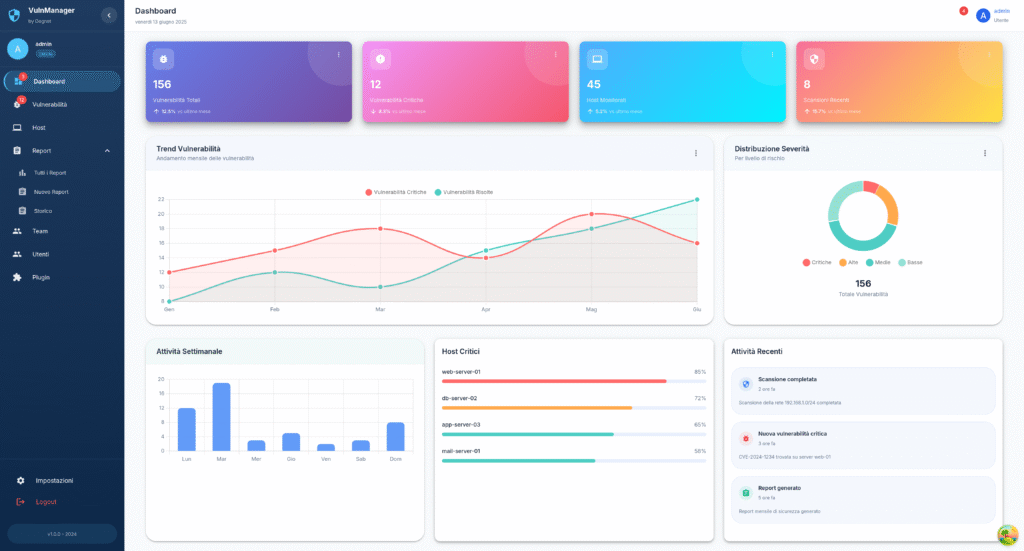
🔔 Notification System
Notification Channels:
Email:
- SMTP configuration with TLS
- HTML templates customizable (logo, colors)
- Attachment support (PDF report)
- Digest mode: Daily/Weekly summary vs real-time
Slack:
- Workspace integration via webhook/OAuth
- Channel routing for severity (#critical, #high, #medium)
- Rich formatting with buttons (Assign to me, Mark False Positive)
- Thread replies → sync back to Sentinel Core comments
Telegram:
- Bot API integration
- Group notifications con mention
- Direct message for personal assignment
- Inline keyboard for quick actions
Microsoft Teams:
- Webhook connector
- Adaptive cards with action buttons
- Channel notifications
Webhook Generics:
- POST JSON at any URL
- Customizable payload template
- Retry logic with exponential backoff
- Signature verification (HMAC) )
PagerDuty/Opsgenie:
- Native integration for on-call management
- Accident creation automatic for Critical vulnerabilities
- Escalation policy sync
Notification Rules:
Logic Routing:
yaml
notifications:
  - trigger: "vulnerability.risk_score >= 80"
    channels: ["slack:#critical", "pagerduty", "email:ciso@company.com"]
    immediate: true

  - trigger: "task.sla_breach_warning"
    channels: ["email:team_leader", "slack:@team_leader"]

  - trigger: "task.assigned_to_me"
    channels: ["email:assignee", "telegram:assignee"]

  - trigger: "daily_digest"
    schedule: "0 9 * * *"  # 9 AM daily
    channels: ["email:all_team_members"]
    content: "summary"
```

**Notification Throttling:**
- Max 1 notification ogni 15 min per stesso evento (evita spam)
- Digest mode per eventi low-priority
- Quiet hours: No notifications 22:00-08:00 (configurable)

---

### **📊 Reportistica Multi-Livello**

**Dashboard Real-Time:**

**Executive Dashboard:**
- **KPI Metrics:**
  - Total vulnerabilities (trend graph)
  - Critical/High/Medium/Low breakdown (pie chart)
  - Mean Time To Remediate (MTTR) - target vs actual
  - SLA compliance rate (%)
  - Risk score evolution (line chart last 90 days)
- **Top Risks**: 10 vulnerabilità highest risk score
- **Team Performance**: Remediation rate per team
- **Compliance Status**: % vulnerabilities affecting compliance

**Operational Dashboard:**
- **My Tasks**: Vulnerabilities assigned to logged user
- **Team Workload**: Task distribution tra team members
- **Upcoming Deadlines**: Task con scadenza <7 giorni
- **Blockers**: Task in stato "Pending Approval" >3 giorni
- **Recent Activity**: Live feed azioni (assignments, closures, comments)

**Technical Dashboard:**
- **Vulnerability Heatmap**: Asset (Y-axis) vs Severity (color)
- **Attack Surface**: External vs Internal vulnerabilities
- **Technology Breakdown**: Vulnerabilities per software (Apache, OpenSSL, etc.)
- **Age Distribution**: Histogram vulnerabilità per età (days open)
- **Re-opened Issues**: Vulnerabilità che ritornano (patch non efficace?)

**Report Types:**

**1. Executive Summary Report:**
- **Audience**: C-level, Board
- **Frequency**: Monthly
- **Content**:
  - 1-page overview con key metrics
  - Risk trend (improving/stable/worsening)
  - Top 3 critical findings con business impact
  - Budget impact analysis (se breach avvenisse)
  - Comparison vs industry benchmark
- **Format**: PDF con charts, presentazione-ready

**2. Technical Vulnerability Report:**
- **Audience**: Security team, DevOps
- **Frequency**: Weekly o on-demand
- **Content**:
  - Detailed vulnerability list con CVSS, EPSS, CVE
  - Affected assets per vulnerability
  - PoC links, exploit details
  - Remediation steps (vendor advisory, patch commands)
  - Verification procedures (come testare post-patch)
  - Rollback plan (se patch causa problemi)
- **Format**: PDF/HTML con code snippets, CLI commands

**3. Compliance Report:**
- **Audience**: Compliance officer, Auditor
- **Frequency**: Quarterly o pre-audit
- **Content**:
  - Mapping vulnerabilities → compliance controls
    - "CVE-2024-1234 affects PCI-DSS Requirement 6.2"
    - "10 vulnerabilities impact ISO 27001 A.12.6.1"
  - Gap analysis: Quali controlli non compliant
  - Evidence: Screenshot, config file, patch logs
  - Remediation timeline con milestone
  - Risk acceptance register (con approval trail)
- **Format**: PDF con digital signature, audit-trail embedded

**4. Team Performance Report:**
- **Audience**: Team Leader, Manager
- **Frequency**: Monthly
- **Content**:
  - Remediation rate per team member
  - MTTR per engineer (chi è più veloce?)
  - SLA compliance per team
  - Workload distribution (chi è overloaded?)
  - Training needs identification (se engineer lento su tipo vuln specifico)
- **Format**: PDF/CSV, può alimentare performance review

**5. Trend Analysis Report:**
- **Audience**: CISO, Security Architect
- **Frequency**: Quarterly
- **Content**:
  - Vulnerability discovery rate trend
  - Remediation velocity trend
  - Technology debt analysis (software EOL con vulns accumulate)
  - Attack surface evolution
  - Recommendation: "Apache instances crescono, consider automation"
- **Format**: PDF con predictive charts

**Export Formats:**
- **PDF**: Standard, branding customizable
- **HTML**: Interactive, embeddable in wiki/intranet
- **CSV**: Per analisi custom (Excel, Tableau, Power BI)
- **JSON**: Per integration automation (scripts, SIEM)
- **XML**: Per legacy systems integration
- **DOCX**: Per editing ulteriore (aggiungere sezioni custom)

**Scheduled Reports:**
- Cron-like scheduling (e.g. "1st Monday every month 9 AM")
- Auto-email a distribution list
- Auto-upload a SFTP/S3/SharePoint
- Retention policy (conserva report per X mesi)

---

### **🔗 Integrazione SOAR & Automation**

**SOAR Platforms Supportati:**

**Splunk SOAR (Phantom):**
- Playbook automation per remediation
- Bi-directional sync: Vuln → SOAR incident, SOAR resolution → Sentinel Core closure
- Actions: Isolate asset, patch via Ansible, re-scan

**Palo Alto Cortex XSOAR (Demisto):**
- Custom integrations via Python
- Incident enrichment con Sentinel Core vulnerability data
- Orchestration: Patch → Test → Rollback se fail

**IBM Resilient:**
- Incident creation automatica per Critical
- Workflow customization per compliance requirement
- Integration con ServiceNow via Resilient

**Rapid7 InsightConnect:**
- Low-code automation builder
- Trigger: New Critical vuln → Slack alert → Jira ticket → Ansible patch

**Microsoft Sentinel (Azure):**
- Log ingestion da Sentinel Core
- Correlation con altri security signals (Azure AD, Defender)
- Automated response via Logic Apps

**Google Chronicle SOAR:**
- Threat intelligence enrichment
- Automated playbooks per cloud vulnerabilities (GCP)

**Swimlane:**
- Visual workflow builder
- Case management integration

**Automation Use Cases:**

**1. Auto-Ticketing:**
```
Trigger: New vulnerability (risk_score >= 60)
Action:
  - Create Jira ticket
  - Assign to appropriate team (via Sentinel Core assignment rules)
  - Add labels: security, vulnerability, [severity]
  - Link CVE references
  - Set due date based SLA
```

**2. Auto-Patching (Low-Risk):**
```
Trigger: New vulnerability (risk_score < 40) + patch available
Action:
  - Check if dev/staging environment
  - Run Ansible playbook: update package
  - Re-scan asset
  - If patch successful: Close vulnerability
  - If patch fails: Create ticket for manual intervention
```

**3. Compliance Escalation:**
```
Trigger: Vulnerability affects PCI-DSS + SLA breach imminent
Action:
  - Send email to Compliance Officer
  - Create high-priority ServiceNow incident
  - Schedule emergency Change Advisory Board meeting
  - Document in compliance risk register
```

**4. Threat Intelligence Enrichment:**
```
Trigger: New vulnerability imported
Action:
  - Query VirusTotal for CVE
  - Query MISP for IoC
  - Check Shodan for asset exposure
  - Update vulnerability with enriched data
  - If active exploitation detected: Escalate to Critical
API Automation:
REST API Endpoints:
POST /api/vulnerabilities– Import vulnerabilityGET /api/vulnerabilities?risk_score_gte=80– Query high-riskPOST /api/vulnerabilities/{id}/assign– Assign to teamPATCH /api/vulnerabilities/{id}– Update statusPOST /api/scan/trigger– Trigger re-scan via API scannerGET /api/reports/generate– Generate programmatically reports
Webhook Triggers:
- On vulnerability created (for scanner integration)
- On vulnerability remediated (for SOAR closure)
- On SLA breach (for escalation automation)
- On risk score change (per prioritization automation)
CI/CD Integration:
yaml
# GitLab CI example
security_scan:
  stage: security
  script:
    - trivy image myapp:latest --format json --output trivy-report.json
    - curl -X POST https://sentinel-core/api/vulnerabilities/import \
        -H "Authorization: Bearer $API_TOKEN" \
        --data-binary @trivy-report.json
  rules:
    - if: $CI_PIPELINE_SOURCE == "merge_request"


## **Casi d'Uso**

### **Caso 1: Enterprise con 1000+ Server - Vulnerability Chaos**

**Scenario:**
Azienda retail italiana 2000 dipendenti, 1200 server (fisici + VM + cloud). Usano Nessus + OpenVAS + Qualys. Ricevono 15.000+ vulnerabilità/mese. Team security (3 persone) sommerso, non sanno da dove iniziare. MTTR 45 giorni. Audit ISO 27001 failed per "unmanaged vulnerabilities".

**Problema:**
- Scanner multipli generano duplicati
- Nessuna prioritizzazione → trattano tutte uguali
- No tracking chi fa cosa
- Management non ha visibility

**Implementazione Sentinel Core:**

**Week 1: Setup**
- Deploy Sentinel Core su VM dedicata
- Integrazione Nessus + OpenVAS + Qualys via API
- Import storico 30 giorni: 15.000 vulnerabilities → deduplicate → 8.500 unique

**Week 2: Prioritization**
- Configurazione risk scoring customizzato:
  - Asset business-critical (payment, e-commerce): +20% weight
  - External exposure: +15% weight
  - PCI-DSS scope: force High priority minimum
- Risultato: 8.500 vulnerabilità → 150 Critical, 800 High (focus su queste)

**Week 3: Team Orchestration**
- Creazione 4 team: Infrastructure, Windows, Linux, Applications
- Assignment automatico vulnerabilities per OS/technology
- Ogni team riceve ~200 High tasks, manageable

**Week 4-8: Workflow**
- Slack integration: Alert Critical in canale dedicato
- Jira integration: Auto-ticket creation
- SLA enforcement: Critical 7 giorni, High 30 giorni
- Dashboard executive: CISO vede progress real-time

**Risultati dopo 3 mesi:**
- **MTTR**: 45 giorni → 12 giorni (73% reduction)
- **Critical backlog**: 150 → 8 (95% cleared)
- **High backlog**: 800 → 120 (85% cleared)
- **SLA compliance**: 35% → 92%
- **Team morale**: Improved (lavoro organizzato vs chaos)
- **Audit ISO 27001**: Passed, auditor impressed by tracking system
- **ROI**: Evitata remediation consulting esterno (~€80k)

---

### **Caso 2: MSP Gestisce 50 Clienti - Multi-Tenancy**

**Scenario:**
MSP gestisce security per 50 PMI clienti. Ogni cliente ha 10-50 asset. Usavano spreadsheet Excel per tracking vulnerabilities. Clienti chiedono report mensili compliance. Team MSP (5 persone) passava 2 giorni/mese solo a preparare report.

**Implementazione:**
- **Multi-tenant deployment**: Istanza Sentinel Core per ogni cliente (isolamento dati)
- **Standardizzazione scanning**: OpenVAS automated scan settimanale tutti clienti
- **Template remediation**: Playbook Ansible per patch comuni (Apache, OpenSSL, kernel)
- **White-label reporting**: Report con logo cliente

**Workflow Automatizzato:**
```
Lunedì: OpenVAS scan automatico 50 clienti (overnight)
Martedì: Import automatico risultati in Sentinel Core
Mercoledì: Assignment automatico task a team MSP
Gio-Ven: Team MSP lavora su remediation
Fine mese: Report automatico generato e inviato a clienti
Results:
- Report generation time: 2 days/month → 1 hour/month (96% reduction)
- Remediation velocity: +40% (thanks automation Ansible)
- Client satisfaction: NPS +25 points (customers appreciate professional reports)
- Upselling: 15 customers bought "managed remediation" premium service (+€30k annual recurring revenue)
- Team efficiency: They run 50 clients with 5 people (first 3 full-time only for reporting)
Case 3: DevOps Team – Shift-Left Security
Scenario:
Startup SaaS 80 employees, release weekly. They want "shift-left" security: find vulnerabilities before production. They use GitLab CI/CD. Security team (2 people) can't be behind speed dev.
Implementation CI/CD Integration:
Pipeline GitLab:
yaml
stages:
  - build
  - test
  - security
  - deploy

security_scan:
  stage: security
  script:
    # Scan Docker image
    - trivy image $CI_REGISTRY_IMAGE:$CI_COMMIT_SHA --format json -o trivy.json

    # Scan dependencies
    - npm audit --json > npm-audit.json

    # Upload to Sentinel Core
    - |
      curl -X POST $SENTINEL_CORE_URL/api/vulnerabilities/import \
        -H "Authorization: Bearer $CI_SENTINEL_TOKEN" \
        -F "trivy=@trivy.json" \
        -F "npm_audit=@npm-audit.json" \
        -F "pipeline_id=$CI_PIPELINE_ID" \
        -F "commit_sha=$CI_COMMIT_SHA"

    # Check if Critical vulnerabilities found
    - |
      CRITICAL_COUNT=$(curl -s "$SENTINEL_CORE_URL/api/vulnerabilities/count?severity=critical&pipeline_id=$CI_PIPELINE_ID" \
        -H "Authorization: Bearer $CI_SENTINEL_TOKEN")

      if [ "$CRITICAL_COUNT" -gt 0 ]; then
        echo "❌ Found $CRITICAL_COUNT critical vulnerabilities. Pipeline blocked."
        exit 1
      fi
  rules:
    - if: $CI_PIPELINE_SOURCE == "merge_request"
```

**Policy:**
- Critical vulnerabilities → Pipeline bloccata, no merge
- High vulnerabilities → Warning, merge consentito ma Jira ticket creato
- Medium/Low → Log only

**Risultati dopo 6 mesi:**
- **Vulnerabilities in production**: -87% (trovate prima in CI/CD)
- **Security debt**: Praticamente zero (no accumulo vulns)
- **Developer happiness**: High (immediate feedback, no sorprese post-deploy)
- **Security team workload**: -60% (developers fixano direttamente in dev phase)
- **Incident response**: Solo 2 security incidents vs 12 anno precedente

---

### **Caso 4: Financial Services - Compliance PCI-DSS**

**Scenario:**
Banca online deve mantenere PCI-DSS compliance. 300 server in scope (cardholder data environment). QSA audit trimestrale. Vulnerability management è PCI-DSS Requirement 6.1/6.2 critical.

**PCI-DSS Requirements:**
- Req 6.1: Scan mensile con ASV approved scanner
- Req 6.2: Patch Critical entro 30 giorni discovery
- Req 11.2: Internal vulnerability scan trimestrale + after significant changes

**Implementazione:**
- **Scanner**: Qualys (ASV approved) per external, Nessus internal
- **Sentinel Core**: Orchestration + compliance reporting
- **Policy enforcement**:
  - Critical PCI scope: SLA 30 giorni (rigido)
  - Automatic escalation CISO se SLA breach risk
  - Change management integration: Ogni patch in prod richiede CAB approval

**Compliance Dashboard:**
- Real-time view: "X Critical vulnerabilities, Y giorni rimanenti per compliance"
- Historical: Last 4 quarters scan results (dimostra continuous compliance)
- Exception tracking: Risk acceptance con justification (per auditor)

**Audit Preparedness:**
```
QSA Request: "Show vulnerability management process"

Response:
1. Monthly ASV scan results (automated via Sentinel Core)
2. Remediation tracking: Tutte Critical risolte entro 30 giorni (evidence: Sentinel Core audit log)
3. Exception register: 2 vulnerabilities risk-accepted (CISO approval documented)
4. Re-scan verification: Post-patch scans confirm closure (automated)
Results:
- QSA Audit: Passed 4 consecutive quarters, zero findings Req 6.1/6.2
- Compliance confidence: 100% (real-time dashboard eliminates surprises)
- Audit time: 2 weeks → 2 days (report already ready)
- Sanction avoidance: PCI non-compliance can cost €5k-100k/month + brand damage
Case 5: Healthcare – HIPAA + Zero Trust
Scenario:
Hospital 500 beds, Electronic Health Records (EHR) system. Patient data = HIPAA protected health information (PHI). Recent ransomware attack healthcare sector → Board demands improvement security.
Challenge:
- Legacy systems: Windows Server 2012 (EOL), medical devices non-patchabili
- Compliance: HIPAA Security Rule requires vulnerability management
- Zero Trust initiative: Segment network, least privilege
Implementation:
- Asset Discovery + Criticality Tagging:
- Sentinel Core import from AD + network scan
- Tagging: PHI-access, Medical-Device, Administrative
- Critical: EHR servers, databases, PACS (radiology)
- Risk-Based Prioritization:
- PHI-access assets: Vulnerabilities auto-escalate +20 risk score
- Medical devices: Virtual patching (can’t patch device, patch network controls)
- Administrative: Standard remediation
- Network Segmentation Validation:
- Integration with Firedog: Verify segmentation correct
- Sentinel Core + Firedog correlation: "Database server vulnerable, but firewall blocks external access → Risk reduced"
- Compensating Controls:
- Windows 2012 (EOL, no patches):
- Network isolation (only EHR app accesses)
- EDR monitoring (CrowdStrike)
- Virtual patching (Firedog blocks exploit patterns)
- Documented in Sentinel Core: "Risk accepted with compensating controls"
- Windows 2012 (EOL, no patches):
Compliance Reporting:
- HIPAA Security Rule §164.308(a)(5): Risk Analysis → Sentinel Core risk scores
- §164.308(a)(8): Periodic Evaluation → Quarterly vulnerability scan reports
- Audit trail: Who did what, when (required for HIPAA audit)
Results:
- Ransomware preparedness: Reduced surface attack 65%
- Legacy systems: Secured via compensating controls (virtual patching + monitoring)
- HIPAA audit: Passed, auditor praised "systematic risk management"
- Council: Dashboard executive show security posture improving
- Patient safety: Zero security incidents affecting patient care
FAQ – Sentinel Core
General
Q: Does Sentinel Core scan active or just manage?
A: Sentinel Core is vulnerability management platformNot an active scanner. Aggregate results from external scanners (Nessus, OpenVAS, Qualys, etc.) and orchestrate them. Why separation? It allows to use better scanners by specific case (web app → Burp, network → Nessus, container → Trivy).
Q: Can I use Sentinel Core without a commercial scanner?
A: Yes, fully compatible with open source scanners:
- OpenVAS (network vulnerability scanning)
- OWASP ZAP (web application)
- Nikto (web server)
- Nmap + NSE scripts (network discovery + basic vuln detection)
- Trivy (container/IaC )
Identical functionality, only coverage scanner varies.
Q: How much is it?
A: €3,000 per year Basic license:
- Unlimited scans (imports from any scanner)
- Storage up to 100,000 historical vulnerabilities
- Unlimited Team/user
- Support standard email 48h
Scale-up:
- 100k-500k vulnerabilities storage: +€1,000/year
- Premium support 24/7: +€2,000 per year
- Professional services (onboarding, integration): €150/hour
Q: How many teams/users can I have?
A: Unlimited in the basic license. Supports organizations 5-500+ people with no additional costs for users.
Scanner Integration
Q: If I use Nessus + OpenVAS, how do I avoid duplicates?
A: Automatic Deduplication:
- Same CVE on the same asset (IP match + hostname) → inherent in single vulnerability
- Keeps metadata from both scanners (by comparison)
- UI shows "Detected by: Nessus, OpenVAS"
Q: Do you support native cloud scanners (AWS Inspector, Azure Security Center)?
A: Roadmap v2.5 (Q4 2025). Currently workaround:
- Export results from AWS Inspector (JSON)
- Import manual/scheduled in Sentinel Core via API
Q: Can I import scan result old (historical)?
A: Yes, historical import useful for:
- Trend analysis (vulnerabilities discovered last month)
- Baseline comparison
- Complete audit trail
Supports retroactive dates in the import.
Q: Automated import vs manual?
A: Both supported:
Automatic (preferred):
- Scanner webhook → push real-time to Sentinel Core
- Scheduled pull: Sentinel Core periodically downloads from API scanners (cron-like)
Manual:
- Upload file via UI (drag & drop)
- Email forwarding: Forward scan email report → automatic parsing
Q: What if scanner finds vulnerabilities already resolved?
A: Re-scan validation:
- If vulnerability in "Remediated" status and scanner finds it → auto-reopen task
- Alert: "Vulnerability CVE-2024-1234 re-appeared, patch in effective? "
- Common causes: Patch rollback, misconfiguration, system restore
Risk Scoring & Prioritization
Q: Can I customize the risk scoring algorithm?
A: Yes, fully configurable:
- Weights of factors (CVSS, EPSS, Business Impact, etc.)
- Add custom factors (e.g. "Compliance Impact" weight
- For asset/technology specific overrides
UI Configuration:
yaml
risk_scoring:
  cvss_weight: 0.30
  epss_weight: 0.25
  business_impact_weight: 0.25
  asset_exposure_weight: 0.15
  exploit_availability_weight: 0.05

  # Custom overrides
  overrides:
    - condition: "asset.tags.compliance == 'PCI-DSS'"
      business_impact_weight: 0.40  # Increase business impact for PCI
```

**Q: EPSS score cos'è e come funziona?**
A: **Exploit Prediction Scoring System** (FIRST.org):
- Machine learning model che predice probabilità exploit nei prossimi 30 giorni
- Basato su: Social media mentions, exploit code availability, attacker TTPs
- Score 0-100%: 5% = bassa probabilità, 90% = quasi certo verrà sfruttato
- **Perché utile**: CVE con CVSS 9.0 ma EPSS 2% < CVE con CVSS 7.0 ma EPSS 80%

**Q: Come definisco "Business Impact" degli asset?**
A: **3 metodi**:

**1. Manual tagging**:
```
Asset: web-prod-01
Tags: critical, payment-processing, revenue-impact-high
Business Impact Score: 25/25
2. CMDB integration:
- Import from ServiceNow/Jira Service Management
- Automatic synchronization
3. Rule-based:
yaml
rules:
  - asset.name matches "prod-*": business_impact = 25
  - asset.name matches "staging-*": business_impact = 10
  - asset.tags contains "pci-scope": business_impact = 25
Q: Vulnerability "Informational" are useless?
A: Not always.:
- Info disclosure (version banner) → útil per attacker reconnaissance
- TLS weak cipher (not exploitable now) → future risk
- Best practice: Remediate however when possible (hardening)
Sentinel Core allows hide/filter Info if too much noise.
Team Management & Workflow
Q: How does self-assignment work at team?
A: Rule engine with match condition → team:
yaml
assignment_rules:
  # Technology-based
  - condition: "vuln.software matches 'apache|nginx'"
    team: "Web Team"

  - condition: "vuln.software matches 'mysql|postgresql|mongodb'"
    team: "Database Team"

  # Asset-based
  - condition: "asset.os == 'Windows'"
    team: "Windows Team"

  - condition: "asset.tags contains 'aws'"
    team: "Cloud Team"

  # Severity-based
  - condition: "vuln.risk_score >= 80"
    team_member_role: "Senior Engineer"  # Only senior handle Critical

  # Skill-based
  - condition: "vuln.cve_id in ['CVE-2024-1234', 'CVE-2024-5678']"
    team_member_skill: "kubernetes"  # Requires K8s expertise
Load balancing: If team has 3 members, it distributes equally (round-robin + current workload).
Q: Are SLA rigid or can I extend?
A: Flexible with justification:
- Extension request: Team member can ask +X days
- Requires: Justification (e.g. "Vendor not responsive, patch ETA 2 weeks")
- Approval: Team Leader or Manager (depending on policy)
- Audit trail: Logged for compliance
Q: What happens if no one takes task within X days?
A: Automatic escalation:
- Task assigned → 24h no action → reminder email assignee
- 72h no action → escalation Team Leader
- 7 days no action (Critical) → escalation Manager + CISO
- Create incident report: "Task abandoned"
Q: Supports approved workflow for prod changes?
A: Yes, configurable endorse matrix:
Example:
yaml
approval_required:
  - condition: "asset.environment == 'production' AND vuln.risk_score >= 60"
    approvers: ["team_leader"]

  - condition: "asset.tags contains 'critical-infrastructure'"
    approvers: ["team_leader", "change_advisory_board"]

  - condition: "remediation.requires_downtime == true"
    approvers: ["business_owner", "team_leader"]
Approval flow: Engineer proposes fix → Approval request → Approver reviews → Approve/Reject → Deployment.
SOAR Integration
Q: Do you need SOAR platformer to use Sentinel Core?
A: No, SOAR is optional for advanced automation. Sentinel Core works standalone with integrated workflows.
When you need SOAR:
- Cross-platform automation (Sentinel Core + SIEM + EDR + Firewall)
- Complex playbook (e.g. isolated assets → backup data → patch → restore → verification)
- Enterprise with team security operations mature
SMEs: Sentinel Core workflow built-in are sufficient (assignment, notification, ticketing).
Q: What automations are possible without SOAR?
A: Built-in automation Sentinel Core:
- Auto-assignment team
- Auto-ticketing (Jira, ServiceNow)
- Auto-notification (Slack, email, PagerDuty)
- Scheduled re-scan (trigger API scanner)
- Report generation & distribution
With SOAR (additional):
- Auto-patching orchestration (Ansible, Chef, Puppet)
- Network isolation (call firewall API)
- Evidence collection (filesystem snapshot, memory dump)
- Multi-tool Relatedon (Sentinel Core + SIEM + Intel Threat)
Q: Integration with Ansible for auto-patching?
A: Yes, via webhook trigger:
Sentinel Core → Webhook → Ansible Tower/AWX → Run playbook
yaml
# Ansible playbook example
- name: Patch Apache CVE-2024-1234
  hosts: "{{ target_host }}"
  tasks:
    - name: Update Apache
      apt:
        name: apache2
        state: latest

    - name: Restart Apache
      service:
        name: apache2
        state: restarted

    - name: Verify patch
      command: apache2 -v
      register: apache_version

    - name: Report back to Sentinel Core
      uri:
        url: "{{ sentinel_core_url }}/api/vulnerabilities/{{ vuln_id }}/verify"
        method: POST
        headers:
          Authorization: "Bearer {{ api_token }}"
        body_format: json
        body:
          status: "remediated"
          patch_version: "{{ apache_version.stdout }}"
```

**Q: Sentinel Core può triggerare security orchestration tools?**
A: **Sì, via webhook/API**. Example integration points:
- **New Critical vuln** → Trigger SOAR incident response playbook
- **SLA breach** → Trigger escalation workflow (PagerDuty)
- **Vulnerability remediated** → Trigger verification re-scan (Nessus API)
- **Risk accepted** → Update firewall rules (compensating control)

---

### **Reporting & Compliance**

**Q: Report sono veramente audit-ready?**
A: **Sì, designed per auditor**:

**Audit Requirements Met**:
- ✅ **Timestamp NTP-synced**: Ogni evento ha timestamp certificato
- ✅ **Immutability**: Eventi logged non modificabili (append-only audit log)
- ✅ **Digital signature** (optional): PDF report con firma digitale
- ✅ **Evidence trail**: Screenshot, config file diff, patch command output
- ✅ **Approval chain**: Chi ha approvato cosa, quando (per Change Management)
- ✅ **Retention policy**: Configurable (e.g. 7 anni per financial services)

**Auditor Feedback** (real cases):
- ISO 27001 auditor: "Best vulnerability tracking system I've seen in SMB"
- PCI-DSS QSA: "Report provided sufficient evidence for Req 6.1/6.2, zero questions"

**Q: Supporta multiple compliance framework simultaneously?**
A: **Sì, multi-framework dashboard**:

**UI View**:
```
Asset: web-prod-01
Compliance Status:
├─ PCI-DSS: 85% (12/14 requirements met)
│  └─ Req 6.2: ⚠️ 3 High vulnerabilities open >30 giorni
├─ ISO 27001: 92% (A.12.6.1 compliant)
├─ NIS2: 78% (Art. 21 partially compliant)
└─ HIPAA: 88% (§164.308 compliant)Report: It can generate single framework or combined reports.
Q: Can I customize layout/logue reports?
A: Yes, full white-labeling:
- Upload logo (header/footer)
- Color scheme (primary/secondary colors)
- Font customization
- Custom cover page with disclaimer text
- Footer text "Confidential – Property of XYZ Corp"
Template system: Save multiple templates for use houses (Executive vs Technical vs Auditor).
Q: Can reports be self-distributed?
A: Yes, scheduled delivery:
Distribution of:
- Email to distribution list (e.g. security-team@company.com)
- Upload SFTP/S3/Azure Blob/Google Cloud Storage
- SharePoint integration (upload to document library)
- Webhook POST (for custom integration)
ScheduleCron-like (e.g. "First Monday of month, 9 AM, email to CISO".
Technical
Q: Hardware requirements?
A: Minimum (SMB, <5000 vulnerabilities):
- CPU: 4 cores @ 2.5GHz
- RAM: 8GB
- Disk: 50GB SSD
- Database: PostgreSQL 12+ (can be same host)
Recommended (Medium enterprise, <50k vulnerabilities):
- CPU: 8 cores @ 3GHz
- RAM: 16GB
- Disk: 200GB SSD
- Database: PostgreSQL dedicated host, 8GB RAM
Large enterprise (>50k vulnerabilities):
- CPU: 16+ cores
- RAM: 32GB+
- Disk: 500GB SSD (NVMe preferred)
- Database: PostgreSQL cluster (HA), 16GB+ RAM
- Load balancer: Nginx/HAProxy for scaling APIs
Q: Sentinel Core scale horizontally?
A: Roadmap v3.0 (2026): Microservices architecture with horizontal scaling.
Currently (v2.x): Vertical scaling + database optimization:
- Single application instance (API + worker processes)
- PostgreSQL can scalare isolated (read replicas)
- Redis cache for API response (reduce DB load)
Scale achieved: Customers managing 100k+ vulnerabilities on single instance (beefy VM).
Q: Need Internet connection?
A: Depends on use houses:
Internet required for:
- EPSS score updates (daily sync by FIRST.org)
- CVE database enrichment (NVD sync)
- Email notifications (SMTP relay)
- Webhook notifications (Slack, PagerDuty, etc.)
- API communication scanners (if cloud-based scanners)
Offline capable:
- Vulnerability import (if file-based)
- Risk scoring (with cached data)
- Team management & workflow
- Reporting
Air-gapped environments: Deploy with sync manual periodic (export/import via USB) or dedicated proxy.
Q: Database supported?
A: – PostgreSQL 12+ (✅ Preferred, best performance + features)
- UUID native support
- JSONB for flexible metadata
- Full-text search
- Partitioning for large datasets
- MySQL/MariaDB 8.0+ (✅ Supported, limited features)
- No native UUID (use BINARY(16))
- JSON support (not JSONB)
- Microsoft SQL Server (❌ Roadmap v2.5)
- Oracle (❌ No plans, licensing cost)
Q: Does it support container deployment (Docker/Kubernetes)?
A: Yes, Docker first-class:
Docker Compose (quickstart):
yaml
version: '3.8'
services:
  sentinel-core:
    image: sentinelsuite/sentinel-core:latest
    ports:
      - "8080:8080"
    environment:
      DATABASE_URL: postgresql://user:pass@db:5432/sentinel
      REDIS_URL: redis://cache:6379
    depends_on:
      - db
      - cache

  db:
    image: postgres:15
    volumes:
      - postgres_data:/var/lib/postgresql/data

  cache:
    image: redis:7-alpine
Kubernetes (Helm chart in development, Q3 2025):
- Horizontal pod autoscaling
- Persistent volumes per database
- Ingress integration (NGINX, Traefik)
- Secrets management (Vault, Sealed Secrets)
Q: API rate limiting?
A: Yes, configurable for security:
Default limits:
- Authenticated requests: 1000/hour for API token
- Unauthenticated: 100/hour for IP (for quote abuse)
- Webhook callbacks: 10000/hour (for high-volume integration scanner)
Customizable for use homes (CI/CD may need higher limit).
Response when limit exceeded:
http://www.
HTTP/1.1 429 Too Many Requests
Retry-After: 3600
X-RateLimit-Limit: 1000
X-RateLimit-Remaining: 0
X-RateLimit-Reset: 1672531200

{
  "error": "Rate limit exceeded",
  "message": "Max 1000 requests per hour. Resets at 2024-01-15T10:00:00Z"
}
