
Caratteristiche Principali
📥 Acquisizione Vulnerabilità Multi-Scanner
Scanner Supportati Nativamente:
Commercial Scanners:
- Tenable Nessus Professional/Expert: API v2 integration, import automatico scan results
- Qualys VMDR: API integration con asset correlation
- Rapid7 Nexpose/InsightVM: Real-time import via webhook
- Acunetix: Web vulnerability import con severity mapping
- Burp Suite Enterprise: REST API integration per web app scanning
Open Source Scanners:
- OpenVAS/Greenbone: XML import con CVE enrichment
- OWASP ZAP: JSON/XML import, CI/CD integration
- Nikto: Web server scanner import
- Nmap + NSE scripts: Network vulnerability detection
- Trivy: Container/IaC vulnerability scanning (roadmap v2.0)
Cloud-Native Scanners (roadmap v2.5):
- AWS Inspector
- Azure Security Center
- Google Cloud Security Command Center
Import Methods:
- API REST: Real-time push da scanner (webhook)
- File upload: Manual/scheduled upload XML/JSON/CSV
- Scheduled pull: Sentinel Core scarica periodicamente da scanner API
- Email import: Forward scan report via email → automatic parsing
Format Support:
- Nessus XML (.nessus)
- OpenVAS XML
- Qualys XML
- JSON generic (schema-flexible)
- CSV (with column mapping)
- SARIF (Static Analysis Results Interchange Format)
Deduplication Intelligente:
- Stesso CVE rilevato da scanner multipli → singola entry
- Asset matching via IP, hostname, MAC address, cloud instance ID
- Version-aware: CVE su Apache 2.4.41 ≠ CVE su Apache 2.4.50
- Temporal deduplication: Re-scan non crea duplicati se vulnerabilità già presente
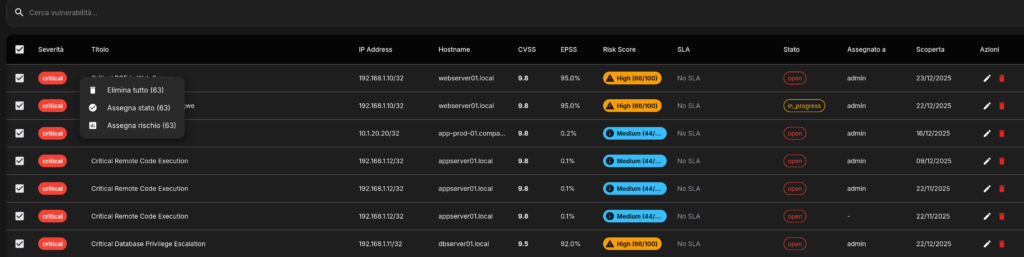
🏷️ Catalogazione e Enrichment Automatico
Vulnerability Metadata:
CVSS (Common Vulnerability Scoring System):
- CVSS v3.1 scoring (preferred)
- CVSS v2 legacy support
- Base score (severity intrinseca)
- Temporal score (exploit availability, remediation level)
- Environmental score (asset criticality, collateral damage)
- Vector string parsing (AV:N/AC:L/PR:N/UI:N/S:U/C:H/I:H/A:H)
EPSS (Exploit Prediction Scoring System):
- Daily updates da FIRST.org
- Probabilità 0-100% exploit nei prossimi 30 giorni
- Percentile ranking (questa CVE è più sfruttabile del X% delle altre)
- Historical trending (EPSS score evoluzione nel tempo)
CVE Database Correlation:
- NVD (National Vulnerability Database) enrichment
- CVE description, references, CWE mapping
- Published date, last modified date
- Vendor advisories links (Microsoft, RedHat, Debian, etc.)
CWE (Common Weakness Enumeration):
- Weakness category (e.g. CWE-79: XSS, CWE-89: SQL Injection)
- OWASP Top 10 mapping
- SANS Top 25 mapping
- Attack pattern references (CAPEC)
Exploit Intelligence:
- Metasploit modules availability
- ExploitDB references
- Public PoC (Proof of Concept) availability
- Active exploitation in the wild (da threat intel feeds)
- Ransomware gang targeting (da CTI reports)
Asset Context:
- Operating System + version
- Installed software inventory
- Service/port exposure (internal vs external)
- Geographic location (datacenter, cloud region)
- Business unit ownership
- Asset criticality (from CMDB integration)
- Environment (production, staging, development)
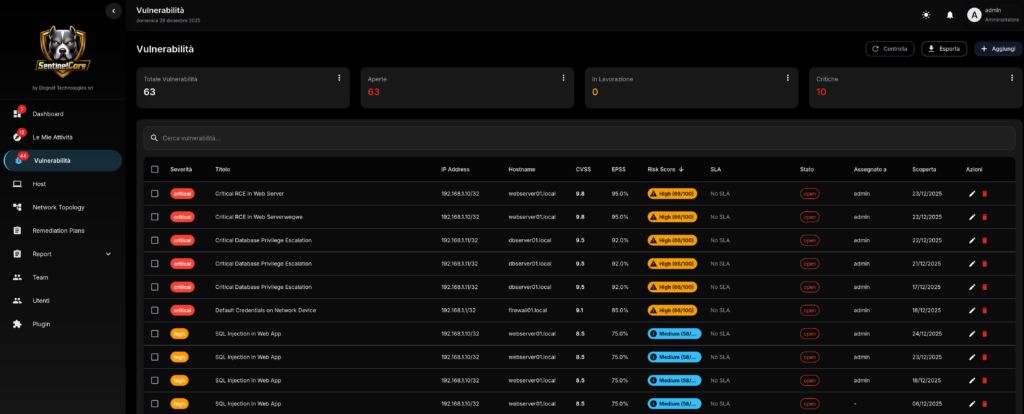
🎯 Prioritizzazione Intelligente
Risk Scoring Algorithm:
Risk Score (0-100) =
  (CVSS Base × 0.30) +
  (EPSS Score × 0.25) +
  (Business Impact × 0.25) +
  (Asset Exposure × 0.15) +
  (Exploit Availability × 0.05)
Fattori Dettagliati:
1. CVSS Base (0-10 → 0-30 punti):
- Critical (9.0-10.0): 30 punti
- High (7.0-8.9): 22 punti
- Medium (4.0-6.9): 15 punti
- Low (0.1-3.9): 5 punti
2. EPSS Score (0-100% → 0-25 punti):
- EPSS >50% (high probability): 25 punti
- EPSS 20-50%: 18 punti
- EPSS 5-20%: 10 punti
- EPSS <5%: 3 punti
3. Business Impact (0-25 punti):
- Asset criticality:
- Critical (payment processing, auth): 25 punti
- High (production web/API): 18 punti
- Medium (internal tools): 10 punti
- Low (dev/test): 3 punti
- Data sensitivity: +5 punti se PII/PCI/PHI
- Revenue impact: +5 punti se downtime costa >€10k/ora
4. Asset Exposure (0-15 punti):
- Internet-facing: 15 punti
- DMZ (limited exposure): 10 punti
- Internal network: 5 punti
- Isolated/air-gapped: 0 punti
- Port exposure: +3 punti se porta critica (RDP, Telnet, SMB)
5. Exploit Availability (0-5 punti):
- Public exploit + active campaigns: 5 punti
- Public exploit (Metasploit, ExploitDB): 4 punti
- PoC available: 3 punti
- Exploit theoretical: 1 punto
- No exploit info: 0 punti
Risk Tiers:
- Critical Risk (80-100): Remediate entro 24h (P1)
- High Risk (60-79): Remediate entro 7 giorni (P2)
- Medium Risk (40-59): Remediate entro 30 giorni (P3)
- Low Risk (20-39): Remediate entro 90 giorni (P4)
- Informational (<20): Monitor, no SLA
Prioritization Overrides:
Manual Override:
- Security team può forzare priority (e.g. compliance requirement)
- Requires justification + approval (audit trail)
Automatic Overrides:
- Zero-day: Auto-escalate a Critical indipendentemente da CVSS
- Ransomware targeted: CVE in active ransomware campaigns → Critical
- Compliance mandate: PCI-DSS critical findings → force P1
- Exploit confirmed (da Intellidog se integrato): +20 punti Risk Score
Remediation Effort Estimation:
- Trivial (patch available, reboot): 1-2 ore
- Easy (patch + config change): 4-8 ore
- Medium (patch + testing + coordination): 1-3 giorni
- Hard (workaround, vendor not responsive): 1-2 settimane
- Very Hard (architectural change, no fix available): >1 mese
Algorithm considera effort vs risk per suggerire optimal sequencing.
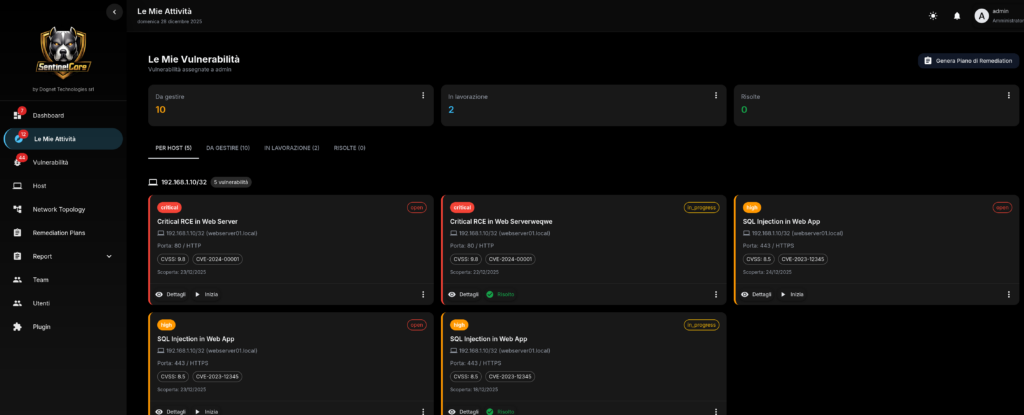
👥 Workflow e Team Orchestration
Team Management:
Team Structure:
- Teams: Gruppi logici (e.g. “Infrastructure Team”, “Web Team”, “Database Team”)
- Members: Utenti assegnati a team con ruoli
- Roles: Team Leader, Senior Engineer, Engineer, Junior
- Skills: Tag competenze (Linux, Windows, AWS, Docker, Apache, etc.)
- Capacity: Workload massimo (e.g. max 10 task simultaneous)
Assignment Rules (Automatic):
Rule-Based Assignment:
yaml
rules:
  - name: "Web vulnerabilities to Web Team"
    condition: asset.tags contains "web" AND vuln.category == "web"
    team: "Web Team"
    priority: high

  - name: "Database vulns to DB Team"
    condition: asset.software contains "mysql|postgresql|mongodb"
    team: "Database Team"

  - name: "Critical always to senior"
    condition: vuln.risk_score >= 80
    team_member_role: "Senior Engineer"
Load Balancing:
- Considera workload corrente di ogni team member
- Distribuisce equamente tra membri con skill match
- Evita overload: se team saturo → escalation a manager
Smart Assignment:
- Historical performance: Assegna a chi ha track record migliore su quel tipo di vuln
- Availability: Rispetta calendar integration (vacanze, training)
- Timezone: Assegna considerando timezone per response time ottimale
Task Lifecycle:
Task States:
- Open: Vulnerabilità rilevata, non ancora assegnata
- Assigned: Assegnata a team/person, in coda
- In Progress: Team member ha preso in carico
- Pending Approval: Fix proposto, richiede approval (per prod changes)
- Approved: Approval ottenuto, deployment schedulato
- Remediated: Fix applicato, pending verification
- Verified: Re-scan conferma vulnerabilità risolta
- Closed: Task completato
- Rejected: Non vulnerabilità reale (false positive)
- Risk Accepted: Management accetta il rischio (con justification)
SLA Tracking:
- Ogni task ha deadline basato su priority
- Real-time countdown dashboard
- Alert escalation quando SLA breach imminente:
- 75% SLA elapsed → reminder al team member
- 90% SLA elapsed → escalation a team leader
- 100% SLA breach → escalation a manager + incident report
Collaboration Features:
- Comments: Team discussion thread su ogni task
- @mentions: Notifica colleghi per input
- File attachments: PoC, config files, screenshots
- Activity log: Chi ha fatto cosa quando (audit trail)
Approval Workflows:
Change Approval (per prod):
- Engineer propone fix → crea Change Request
- Team Leader reviews → technical approval
- Change Advisory Board (se critical asset) → business approval
- Deployment window scheduling
- Post-deployment verification
Risk Acceptance:
- Se vulnerabilità non patchabile (legacy system)
- Requires: Justification, mitigating controls, expiration date
- Approval: CISO o equivalent
- Regular review: Ogni 90 giorni
🔔 Notification System
Notification Channels:
Email:
- SMTP configuration con TLS
- HTML templates customizable (logo, colors)
- Attachment support (report PDF)
- Digest mode: Daily/Weekly summary vs real-time
Slack:
- Workspace integration via webhook/OAuth
- Channel routing per severity (#critical, #high, #medium)
- Rich formatting con buttons (Assign to me, Mark False Positive)
- Thread replies → sync back to Sentinel Core comments
Telegram:
- Bot API integration
- Group notifications con mention
- Direct message per assignment personali
- Inline keyboard per quick actions
Microsoft Teams:
- Webhook connector
- Adaptive cards con action buttons
- Channel notifications
Webhook Generici:
- POST JSON a qualsiasi URL
- Customizable payload template
- Retry logic con exponential backoff
- Signature verification (HMAC)
PagerDuty/Opsgenie:
- Integration nativa per on-call management
- Incident creation automatica per Critical vulnerabilities
- Escalation policy sync
Notification Rules:
Routing Logic:
yaml
notifications:
  - trigger: "vulnerability.risk_score >= 80"
    channels: ["slack:#critical", "pagerduty", "email:ciso@company.com"]
    immediate: true

  - trigger: "task.sla_breach_warning"
    channels: ["email:team_leader", "slack:@team_leader"]

  - trigger: "task.assigned_to_me"
    channels: ["email:assignee", "telegram:assignee"]

  - trigger: "daily_digest"
    schedule: "0 9 * * *"  # 9 AM daily
    channels: ["email:all_team_members"]
    content: "summary"
```

**Notification Throttling:**
- Max 1 notification ogni 15 min per stesso evento (evita spam)
- Digest mode per eventi low-priority
- Quiet hours: No notifications 22:00-08:00 (configurable)

---

### **📊 Reportistica Multi-Livello**

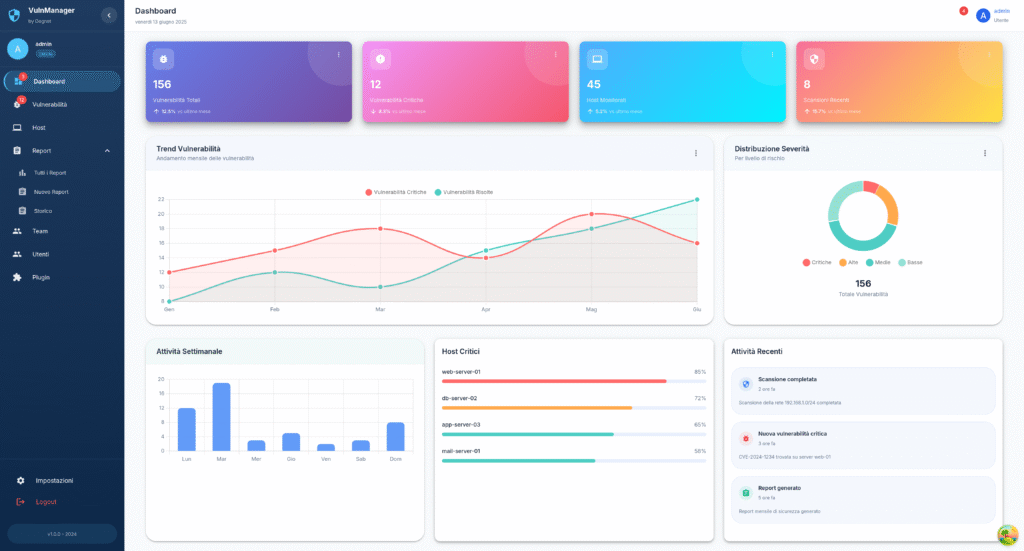
**Dashboard Real-Time:**

**Executive Dashboard:**
- **KPI Metrics:**
  - Total vulnerabilities (trend graph)
  - Critical/High/Medium/Low breakdown (pie chart)
  - Mean Time To Remediate (MTTR) - target vs actual
  - SLA compliance rate (%)
  - Risk score evolution (line chart last 90 days)
- **Top Risks**: 10 vulnerabilità highest risk score
- **Team Performance**: Remediation rate per team
- **Compliance Status**: % vulnerabilities affecting compliance

**Operational Dashboard:**
- **My Tasks**: Vulnerabilities assigned to logged user
- **Team Workload**: Task distribution tra team members
- **Upcoming Deadlines**: Task con scadenza <7 giorni
- **Blockers**: Task in stato "Pending Approval" >3 giorni
- **Recent Activity**: Live feed azioni (assignments, closures, comments)

**Technical Dashboard:**
- **Vulnerability Heatmap**: Asset (Y-axis) vs Severity (color)
- **Attack Surface**: External vs Internal vulnerabilities
- **Technology Breakdown**: Vulnerabilities per software (Apache, OpenSSL, etc.)
- **Age Distribution**: Histogram vulnerabilità per età (days open)
- **Re-opened Issues**: Vulnerabilità che ritornano (patch non efficace?)

**Report Types:**

**1. Executive Summary Report:**
- **Audience**: C-level, Board
- **Frequency**: Monthly
- **Content**:
  - 1-page overview con key metrics
  - Risk trend (improving/stable/worsening)
  - Top 3 critical findings con business impact
  - Budget impact analysis (se breach avvenisse)
  - Comparison vs industry benchmark
- **Format**: PDF con charts, presentazione-ready

**2. Technical Vulnerability Report:**
- **Audience**: Security team, DevOps
- **Frequency**: Weekly o on-demand
- **Content**:
  - Detailed vulnerability list con CVSS, EPSS, CVE
  - Affected assets per vulnerability
  - PoC links, exploit details
  - Remediation steps (vendor advisory, patch commands)
  - Verification procedures (come testare post-patch)
  - Rollback plan (se patch causa problemi)
- **Format**: PDF/HTML con code snippets, CLI commands

**3. Compliance Report:**
- **Audience**: Compliance officer, Auditor
- **Frequency**: Quarterly o pre-audit
- **Content**:
  - Mapping vulnerabilities → compliance controls
    - "CVE-2024-1234 affects PCI-DSS Requirement 6.2"
    - "10 vulnerabilities impact ISO 27001 A.12.6.1"
  - Gap analysis: Quali controlli non compliant
  - Evidence: Screenshot, config file, patch logs
  - Remediation timeline con milestone
  - Risk acceptance register (con approval trail)
- **Format**: PDF con digital signature, audit-trail embedded

**4. Team Performance Report:**
- **Audience**: Team Leader, Manager
- **Frequency**: Monthly
- **Content**:
  - Remediation rate per team member
  - MTTR per engineer (chi è più veloce?)
  - SLA compliance per team
  - Workload distribution (chi è overloaded?)
  - Training needs identification (se engineer lento su tipo vuln specifico)
- **Format**: PDF/CSV, può alimentare performance review

**5. Trend Analysis Report:**
- **Audience**: CISO, Security Architect
- **Frequency**: Quarterly
- **Content**:
  - Vulnerability discovery rate trend
  - Remediation velocity trend
  - Technology debt analysis (software EOL con vulns accumulate)
  - Attack surface evolution
  - Recommendation: "Apache instances crescono, consider automation"
- **Format**: PDF con predictive charts

**Export Formats:**
- **PDF**: Standard, branding customizable
- **HTML**: Interactive, embeddable in wiki/intranet
- **CSV**: Per analisi custom (Excel, Tableau, Power BI)
- **JSON**: Per integration automation (scripts, SIEM)
- **XML**: Per legacy systems integration
- **DOCX**: Per editing ulteriore (aggiungere sezioni custom)

**Scheduled Reports:**
- Cron-like scheduling (e.g. "1st Monday every month 9 AM")
- Auto-email a distribution list
- Auto-upload a SFTP/S3/SharePoint
- Retention policy (conserva report per X mesi)

---

### **🔗 Integrazione SOAR & Automation**

**SOAR Platforms Supportati:**

**Splunk SOAR (Phantom):**
- Playbook automation per remediation
- Bi-directional sync: Vuln → SOAR incident, SOAR resolution → Sentinel Core closure
- Actions: Isolate asset, patch via Ansible, re-scan

**Palo Alto Cortex XSOAR (Demisto):**
- Custom integrations via Python
- Incident enrichment con Sentinel Core vulnerability data
- Orchestration: Patch → Test → Rollback se fail

**IBM Resilient:**
- Incident creation automatica per Critical
- Workflow customization per compliance requirement
- Integration con ServiceNow via Resilient

**Rapid7 InsightConnect:**
- Low-code automation builder
- Trigger: New Critical vuln → Slack alert → Jira ticket → Ansible patch

**Microsoft Sentinel (Azure):**
- Log ingestion da Sentinel Core
- Correlation con altri security signals (Azure AD, Defender)
- Automated response via Logic Apps

**Google Chronicle SOAR:**
- Threat intelligence enrichment
- Automated playbooks per cloud vulnerabilities (GCP)

**Swimlane:**
- Visual workflow builder
- Case management integration

**Automation Use Cases:**

**1. Auto-Ticketing:**
```
Trigger: New vulnerability (risk_score >= 60)
Action:
  - Create Jira ticket
  - Assign to appropriate team (via Sentinel Core assignment rules)
  - Add labels: security, vulnerability, [severity]
  - Link CVE references
  - Set due date based SLA
```

**2. Auto-Patching (Low-Risk):**
```
Trigger: New vulnerability (risk_score < 40) + patch available
Action:
  - Check if dev/staging environment
  - Run Ansible playbook: update package
  - Re-scan asset
  - If patch successful: Close vulnerability
  - If patch fails: Create ticket for manual intervention
```

**3. Compliance Escalation:**
```
Trigger: Vulnerability affects PCI-DSS + SLA breach imminent
Action:
  - Send email to Compliance Officer
  - Create high-priority ServiceNow incident
  - Schedule emergency Change Advisory Board meeting
  - Document in compliance risk register
```

**4. Threat Intelligence Enrichment:**
```
Trigger: New vulnerability imported
Action:
  - Query VirusTotal for CVE
  - Query MISP for IoC
  - Check Shodan for asset exposure
  - Update vulnerability with enriched data
  - If active exploitation detected: Escalate to Critical
API Automation:
REST API Endpoints:
POST /api/vulnerabilities– Import vulnerabilityGET /api/vulnerabilities?risk_score_gte=80– Query high-riskPOST /api/vulnerabilities/{id}/assign– Assign to teamPATCH /api/vulnerabilities/{id}– Update statusPOST /api/scan/trigger– Trigger re-scan via scanner APIGET /api/reports/generate– Generate report programmatically
Webhook Triggers:
- On vulnerability created (per scanner integration)
- On vulnerability remediated (per SOAR closure)
- On SLA breach (per escalation automation)
- On risk score change (per prioritization automation)
CI/CD Integration:
yaml
# GitLab CI example
security_scan:
  stage: security
  script:
    - trivy image myapp:latest --format json --output trivy-report.json
    - curl -X POST https://sentinel-core/api/vulnerabilities/import \
        -H "Authorization: Bearer $API_TOKEN" \
        --data-binary @trivy-report.json
  rules:
    - if: $CI_PIPELINE_SOURCE == "merge_request"


## **Casi d'Uso**

### **Caso 1: Enterprise con 1000+ Server - Vulnerability Chaos**

**Scenario:**
Azienda retail italiana 2000 dipendenti, 1200 server (fisici + VM + cloud). Usano Nessus + OpenVAS + Qualys. Ricevono 15.000+ vulnerabilità/mese. Team security (3 persone) sommerso, non sanno da dove iniziare. MTTR 45 giorni. Audit ISO 27001 failed per "unmanaged vulnerabilities".

**Problema:**
- Scanner multipli generano duplicati
- Nessuna prioritizzazione → trattano tutte uguali
- No tracking chi fa cosa
- Management non ha visibility

**Implementazione Sentinel Core:**

**Week 1: Setup**
- Deploy Sentinel Core su VM dedicata
- Integrazione Nessus + OpenVAS + Qualys via API
- Import storico 30 giorni: 15.000 vulnerabilities → deduplicate → 8.500 unique

**Week 2: Prioritization**
- Configurazione risk scoring customizzato:
  - Asset business-critical (payment, e-commerce): +20% weight
  - External exposure: +15% weight
  - PCI-DSS scope: force High priority minimum
- Risultato: 8.500 vulnerabilità → 150 Critical, 800 High (focus su queste)

**Week 3: Team Orchestration**
- Creazione 4 team: Infrastructure, Windows, Linux, Applications
- Assignment automatico vulnerabilities per OS/technology
- Ogni team riceve ~200 High tasks, manageable

**Week 4-8: Workflow**
- Slack integration: Alert Critical in canale dedicato
- Jira integration: Auto-ticket creation
- SLA enforcement: Critical 7 giorni, High 30 giorni
- Dashboard executive: CISO vede progress real-time

**Risultati dopo 3 mesi:**
- **MTTR**: 45 giorni → 12 giorni (73% reduction)
- **Critical backlog**: 150 → 8 (95% cleared)
- **High backlog**: 800 → 120 (85% cleared)
- **SLA compliance**: 35% → 92%
- **Team morale**: Improved (lavoro organizzato vs chaos)
- **Audit ISO 27001**: Passed, auditor impressed by tracking system
- **ROI**: Evitata remediation consulting esterno (~€80k)

---

### **Caso 2: MSP Gestisce 50 Clienti - Multi-Tenancy**

**Scenario:**
MSP gestisce security per 50 PMI clienti. Ogni cliente ha 10-50 asset. Usavano spreadsheet Excel per tracking vulnerabilities. Clienti chiedono report mensili compliance. Team MSP (5 persone) passava 2 giorni/mese solo a preparare report.

**Implementazione:**
- **Multi-tenant deployment**: Istanza Sentinel Core per ogni cliente (isolamento dati)
- **Standardizzazione scanning**: OpenVAS automated scan settimanale tutti clienti
- **Template remediation**: Playbook Ansible per patch comuni (Apache, OpenSSL, kernel)
- **White-label reporting**: Report con logo cliente

**Workflow Automatizzato:**
```
Lunedì: OpenVAS scan automatico 50 clienti (overnight)
Martedì: Import automatico risultati in Sentinel Core
Mercoledì: Assignment automatico task a team MSP
Gio-Ven: Team MSP lavora su remediation
Fine mese: Report automatico generato e inviato a clienti
Risultati:
- Report generation time: 2 giorni/mese → 1 ora/mese (96% reduction)
- Remediation velocity: +40% (grazie automation Ansible)
- Client satisfaction: NPS +25 punti (clienti apprezzano report professionali)
- Upselling: 15 clienti hanno comprato “managed remediation” premium service (+€30k annual recurring revenue)
- Team efficiency: Gestiscono 50 clienti con 5 persone (prima 3 full-time solo per reporting)
Caso 3: DevOps Team – Shift-Left Security
Scenario:
Startup SaaS 80 dipendenti, rilasci settimanali. Vogliono “shift-left” security: trovare vulnerabilities prima di produzione. Usano GitLab CI/CD. Security team (2 persone) non riesce stare dietro a velocity dev.
Implementazione CI/CD Integration:
Pipeline GitLab:
yaml
stages:
  - build
  - test
  - security
  - deploy

security_scan:
  stage: security
  script:
    # Scan Docker image
    - trivy image $CI_REGISTRY_IMAGE:$CI_COMMIT_SHA --format json -o trivy.json

    # Scan dependencies
    - npm audit --json > npm-audit.json

    # Upload to Sentinel Core
    - |
      curl -X POST $SENTINEL_CORE_URL/api/vulnerabilities/import \
        -H "Authorization: Bearer $CI_SENTINEL_TOKEN" \
        -F "trivy=@trivy.json" \
        -F "npm_audit=@npm-audit.json" \
        -F "pipeline_id=$CI_PIPELINE_ID" \
        -F "commit_sha=$CI_COMMIT_SHA"

    # Check if Critical vulnerabilities found
    - |
      CRITICAL_COUNT=$(curl -s "$SENTINEL_CORE_URL/api/vulnerabilities/count?severity=critical&pipeline_id=$CI_PIPELINE_ID" \
        -H "Authorization: Bearer $CI_SENTINEL_TOKEN")

      if [ "$CRITICAL_COUNT" -gt 0 ]; then
        echo "❌ Found $CRITICAL_COUNT critical vulnerabilities. Pipeline blocked."
        exit 1
      fi
  rules:
    - if: $CI_PIPELINE_SOURCE == "merge_request"
```

**Policy:**
- Critical vulnerabilities → Pipeline bloccata, no merge
- High vulnerabilities → Warning, merge consentito ma Jira ticket creato
- Medium/Low → Log only

**Risultati dopo 6 mesi:**
- **Vulnerabilities in production**: -87% (trovate prima in CI/CD)
- **Security debt**: Praticamente zero (no accumulo vulns)
- **Developer happiness**: High (immediate feedback, no sorprese post-deploy)
- **Security team workload**: -60% (developers fixano direttamente in dev phase)
- **Incident response**: Solo 2 security incidents vs 12 anno precedente

---

### **Caso 4: Financial Services - Compliance PCI-DSS**

**Scenario:**
Banca online deve mantenere PCI-DSS compliance. 300 server in scope (cardholder data environment). QSA audit trimestrale. Vulnerability management è PCI-DSS Requirement 6.1/6.2 critical.

**PCI-DSS Requirements:**
- Req 6.1: Scan mensile con ASV approved scanner
- Req 6.2: Patch Critical entro 30 giorni discovery
- Req 11.2: Internal vulnerability scan trimestrale + after significant changes

**Implementazione:**
- **Scanner**: Qualys (ASV approved) per external, Nessus internal
- **Sentinel Core**: Orchestration + compliance reporting
- **Policy enforcement**:
  - Critical PCI scope: SLA 30 giorni (rigido)
  - Automatic escalation CISO se SLA breach risk
  - Change management integration: Ogni patch in prod richiede CAB approval

**Compliance Dashboard:**
- Real-time view: "X Critical vulnerabilities, Y giorni rimanenti per compliance"
- Historical: Last 4 quarters scan results (dimostra continuous compliance)
- Exception tracking: Risk acceptance con justification (per auditor)

**Audit Preparedness:**
```
QSA Request: "Show vulnerability management process"

Response:
1. Monthly ASV scan results (automated via Sentinel Core)
2. Remediation tracking: Tutte Critical risolte entro 30 giorni (evidence: Sentinel Core audit log)
3. Exception register: 2 vulnerabilities risk-accepted (CISO approval documented)
4. Re-scan verification: Post-patch scans confirm closure (automated)
Risultati:
- QSA Audit: Passed 4 trimestri consecutivi, zero findings Req 6.1/6.2
- Compliance confidence: 100% (real-time dashboard elimina sorprese)
- Audit preparation time: 2 settimane → 2 giorni (report già pronti)
- Sanction avoidance: PCI non-compliance può costare €5k-100k/mese + brand damage
Caso 5: Healthcare – HIPAA + Zero Trust
Scenario:
Ospedale 500 letti, Electronic Health Records (EHR) system. Dati pazienti = HIPAA protected health information (PHI). Recent ransomware attack settore healthcare → Board esige miglioramento security.
Challenge:
- Legacy systems: Windows Server 2012 (EOL), medical devices non-patchabili
- Compliance: HIPAA Security Rule richiede vulnerability management
- Zero Trust initiative: Segment network, least privilege
Implementazione:
- Asset Discovery + Criticality Tagging:
- Sentinel Core import da AD + network scan
- Tagging: PHI-access, Medical-Device, Administrative
- Critical: EHR servers, database, PACS (radiology)
- Risk-Based Prioritization:
- PHI-access assets: Vulnerabilities auto-escalate +20 risk score
- Medical devices: Virtual patching (can’t patch device, patch network controls)
- Administrative: Standard remediation
- Network Segmentation Validation:
- Integration con Firedog: Verify segmentation correct
- Sentinel Core + Firedog correlation: “Database server vulnerable, but firewall blocks external access → Risk reduced”
- Compensating Controls:
- Windows 2012 (EOL, no patches):
- Network isolation (solo EHR app accede)
- EDR monitoring (CrowdStrike)
- Virtual patching (Firedog blocca exploit patterns)
- Documented in Sentinel Core: “Risk accepted con compensating controls”
- Windows 2012 (EOL, no patches):
Compliance Reporting:
- HIPAA Security Rule §164.308(a)(5): Risk Analysis → Sentinel Core risk scores
- §164.308(a)(8): Evaluation periodic → Quarterly vulnerability scan reports
- Audit trail: Chi ha fatto cosa, quando (required per HIPAA audit)
Risultati:
- Ransomware preparedness: Attack surface ridotta 65%
- Legacy systems: Secured via compensating controls (virtual patching + monitoring)
- HIPAA audit: Passed, auditor praised “systematic risk management”
- Board confidence: Dashboard executive mostra security posture improving
- Patient safety: Zero security incidents affecting patient care
FAQ – Sentinel Core
Generale
Q: Sentinel Core fa scanning attivo o solo gestione?
A: Sentinel Core è vulnerability management platform, non uno scanner attivo. Aggrega risultati da scanner esterni (Nessus, OpenVAS, Qualys, etc.) e li orchestra. Perché separazione? Permette di usare scanner migliori per caso specifico (web app → Burp, network → Nessus, container → Trivy).
Q: Posso usare Sentinel Core senza scanner commerciali?
A: Sì, completamente compatibile con scanner open source:
- OpenVAS (network vulnerability scanning)
- OWASP ZAP (web application)
- Nikto (web server)
- Nmap + NSE scripts (network discovery + basic vuln detection)
- Trivy (container/IaC)
Funzionalità identiche, solo coverage scanner varia.
Q: Quanto costa?
A: €3.000/anno licenza base:
- Scansioni illimitate (import da qualsiasi scanner)
- Storage fino 100.000 vulnerabilità storiche
- Team/user illimitati
- Support standard email 48h
Scale-up:
- 100k-500k vulnerabilities storage: +€1.000/anno
- Premium support 24/7: +€2.000/anno
- Professional services (onboarding, integration): €150/ora
Q: Quanti team/utenti posso avere?
A: Illimitati nella licenza base. Supporta organizzazioni 5-500+ persone senza costi aggiuntivi per utenti.
Scanner Integration
Q: Se uso Nessus + OpenVAS, come evito duplicati?
A: Deduplication automatica:
- Stesso CVE su stesso asset (match IP + hostname) → merged in singola vulnerability
- Mantiene metadati da entrambi scanner (per comparison)
- UI mostra “Detected by: Nessus, OpenVAS”
Q: Supportate scanner cloud nativi (AWS Inspector, Azure Security Center)?
A: Roadmap v2.5 (Q4 2025). Attualmente workaround:
- Export risultati da AWS Inspector (JSON)
- Import manuale/scheduled in Sentinel Core via API
Q: Posso importare scan result vecchi (storico)?
A: Sì, import storico utile per:
- Trend analysis (vulnerabilities scoperte mese scorso)
- Baseline comparison
- Audit trail completo
Supporta date retroattive nell’import.
Q: Import automatico vs manuale?
A: Entrambi supportati:
Automatic (preferred):
- Scanner webhook → push real-time a Sentinel Core
- Scheduled pull: Sentinel Core scarica periodicamente da scanner API (cron-like)
Manual:
- Upload file via UI (drag & drop)
- Email forwarding: Forward scan report email → automatic parsing
Q: Cosa succede se scanner trova vulnerabilità già risolta?
A: Re-scan validation:
- Se vulnerability in stato “Remediated” e scanner la ritrova → auto-reopen task
- Alert: “Vulnerability CVE-2024-1234 re-appeared, patch ineffective?”
- Common cause: Patch rollback, misconfiguration, system restore
Risk Scoring & Prioritization
Q: Posso customizzare l’algoritmo di risk scoring?
A: Sì, completamente configurabile:
- Pesi dei fattori (CVSS, EPSS, Business Impact, etc.) modificabili
- Aggiungere fattori custom (e.g. “Compliance Impact” weight)
- Per asset/technology specific overrides
UI Configuration:
yaml
risk_scoring:
  cvss_weight: 0.30
  epss_weight: 0.25
  business_impact_weight: 0.25
  asset_exposure_weight: 0.15
  exploit_availability_weight: 0.05

  # Custom overrides
  overrides:
    - condition: "asset.tags.compliance == 'PCI-DSS'"
      business_impact_weight: 0.40  # Increase business impact for PCI
```

**Q: EPSS score cos'è e come funziona?**
A: **Exploit Prediction Scoring System** (FIRST.org):
- Machine learning model che predice probabilità exploit nei prossimi 30 giorni
- Basato su: Social media mentions, exploit code availability, attacker TTPs
- Score 0-100%: 5% = bassa probabilità, 90% = quasi certo verrà sfruttato
- **Perché utile**: CVE con CVSS 9.0 ma EPSS 2% < CVE con CVSS 7.0 ma EPSS 80%

**Q: Come definisco "Business Impact" degli asset?**
A: **3 metodi**:

**1. Manual tagging**:
```
Asset: web-prod-01
Tags: critical, payment-processing, revenue-impact-high
Business Impact Score: 25/25
2. CMDB integration:
- Import da ServiceNow/Jira Service Management
- Automatic sync asset criticality
3. Rule-based:
yaml
rules:
  - asset.name matches "prod-*": business_impact = 25
  - asset.name matches "staging-*": business_impact = 10
  - asset.tags contains "pci-scope": business_impact = 25
Q: Vulnerabilità “Informational” sono inutili?
A: Non sempre:
- Info disclosure (version banner) → útil per attacker reconnaissance
- TLS weak cipher (non exploitable ora) → future risk
- Best practice: Remediate comunque quando possibile (hardening)
Sentinel Core permette hide/filter Info se troppo rumore.
Team Management & Workflow
Q: Come funziona auto-assignment a team?
A: Rule engine con match condition → team:
yaml
assignment_rules:
  # Technology-based
  - condition: "vuln.software matches 'apache|nginx'"
    team: "Web Team"

  - condition: "vuln.software matches 'mysql|postgresql|mongodb'"
    team: "Database Team"

  # Asset-based
  - condition: "asset.os == 'Windows'"
    team: "Windows Team"

  - condition: "asset.tags contains 'aws'"
    team: "Cloud Team"

  # Severity-based
  - condition: "vuln.risk_score >= 80"
    team_member_role: "Senior Engineer"  # Only senior handle Critical

  # Skill-based
  - condition: "vuln.cve_id in ['CVE-2024-1234', 'CVE-2024-5678']"
    team_member_skill: "kubernetes"  # Requires K8s expertise
Load balancing: Se team ha 3 membri, distribuisce equamente (round-robin + current workload).
Q: SLA sono rigidi o posso estendere?
A: Flessibili con justification:
- Extension request: Team member può chiedere +X giorni
- Requires: Justification (e.g. “Vendor not responsive, patch ETA 2 weeks”)
- Approval: Team Leader o Manager (dipende da policy)
- Audit trail: Logged per compliance
Q: Cosa succede se nessuno prende task entro X giorni?
A: Escalation automatica:
- Task assigned → 24h no action → reminder email assignee
- 72h no action → escalation Team Leader
- 7 giorni no action (Critical) → escalation Manager + CISO
- Create incident report: “Task abandoned”
Q: Supporta approval workflow per prod changes?
A: Sì, configurable approval matrix:
Example Policy:
yaml
approval_required:
  - condition: "asset.environment == 'production' AND vuln.risk_score >= 60"
    approvers: ["team_leader"]

  - condition: "asset.tags contains 'critical-infrastructure'"
    approvers: ["team_leader", "change_advisory_board"]

  - condition: "remediation.requires_downtime == true"
    approvers: ["business_owner", "team_leader"]
Approval flow: Engineer propone fix → Approval request → Approver reviews → Approve/Reject → Deployment.
SOAR Integration
Q: Serve SOAR platform per usare Sentinel Core?
A: No, SOAR è opzionale per automation avanzata. Sentinel Core funziona standalone con workflow integrati.
Quando serve SOAR:
- Automation cross-platform (Sentinel Core + SIEM + EDR + Firewall)
- Complex playbook (e.g. isolate asset → backup data → patch → restore → verify)
- Enterprise con team security operations mature
PMI: Sentinel Core workflow built-in sono sufficienti (assignment, notification, ticketing).
Q: Quali automation sono possibili senza SOAR?
A: Built-in automation Sentinel Core:
- Auto-assignment team
- Auto-ticketing (Jira, ServiceNow)
- Auto-notification (Slack, email, PagerDuty)
- Scheduled re-scan (trigger scanner API)
- Report generation & distribution
Con SOAR (additional):
- Auto-patching orchestration (Ansible, Chef, Puppet)
- Network isolation (call firewall API)
- Evidence collection (filesystem snapshot, memory dump)
- Multi-tool correlation (Sentinel Core + SIEM + Threat Intel)
Q: Integration con Ansible per auto-patching?
A: Sì, via webhook trigger:
Sentinel Core → Webhook → Ansible Tower/AWX → Run playbook
yaml
# Ansible playbook example
- name: Patch Apache CVE-2024-1234
  hosts: "{{ target_host }}"
  tasks:
    - name: Update Apache
      apt:
        name: apache2
        state: latest

    - name: Restart Apache
      service:
        name: apache2
        state: restarted

    - name: Verify patch
      command: apache2 -v
      register: apache_version

    - name: Report back to Sentinel Core
      uri:
        url: "{{ sentinel_core_url }}/api/vulnerabilities/{{ vuln_id }}/verify"
        method: POST
        headers:
          Authorization: "Bearer {{ api_token }}"
        body_format: json
        body:
          status: "remediated"
          patch_version: "{{ apache_version.stdout }}"
```

**Q: Sentinel Core può triggerare security orchestration tools?**
A: **Sì, via webhook/API**. Example integration points:
- **New Critical vuln** → Trigger SOAR incident response playbook
- **SLA breach** → Trigger escalation workflow (PagerDuty)
- **Vulnerability remediated** → Trigger verification re-scan (Nessus API)
- **Risk accepted** → Update firewall rules (compensating control)

---

### **Reporting & Compliance**

**Q: Report sono veramente audit-ready?**
A: **Sì, designed per auditor**:

**Audit Requirements Met**:
- ✅ **Timestamp NTP-synced**: Ogni evento ha timestamp certificato
- ✅ **Immutability**: Eventi logged non modificabili (append-only audit log)
- ✅ **Digital signature** (optional): PDF report con firma digitale
- ✅ **Evidence trail**: Screenshot, config file diff, patch command output
- ✅ **Approval chain**: Chi ha approvato cosa, quando (per Change Management)
- ✅ **Retention policy**: Configurable (e.g. 7 anni per financial services)

**Auditor Feedback** (real cases):
- ISO 27001 auditor: "Best vulnerability tracking system I've seen in SMB"
- PCI-DSS QSA: "Report provided sufficient evidence for Req 6.1/6.2, zero questions"

**Q: Supporta multiple compliance framework simultaneously?**
A: **Sì, multi-framework dashboard**:

**UI View**:
```
Asset: web-prod-01
Compliance Status:
├─ PCI-DSS: 85% (12/14 requirements met)
│  └─ Req 6.2: ⚠️ 3 High vulnerabilities open >30 giorni
├─ ISO 27001: 92% (A.12.6.1 compliant)
├─ NIS2: 78% (Art. 21 partially compliant)
└─ HIPAA: 88% (§164.308 compliant)Report: Può generare report singolo framework o combined.
Q: Posso customizzare report layout/logo?
A: Sì, white-labeling completo:
- Upload logo (header/footer)
- Color scheme (primary/secondary colors)
- Font customization
- Custom cover page con disclaimer text
- Footer text (e.g. “Confidential – Property of XYZ Corp”)
Template system: Save multiple templates per use case (Executive vs Technical vs Auditor).
Q: Report possono essere auto-distribuiti?
A: Sì, scheduled delivery:
Distribution methods:
- Email a distribution list (e.g. security-team@company.com)
- Upload SFTP/S3/Azure Blob/Google Cloud Storage
- SharePoint integration (upload to document library)
- Webhook POST (per integration custom)
Schedule: Cron-like (e.g. “First Monday of month, 9 AM, email to CISO”).
Technical
Q: Requisiti hardware?
A: Minimum (SMB, <5000 vulnerabilities):
- CPU: 4 cores @ 2.5GHz
- RAM: 8GB
- Disk: 50GB SSD
- Database: PostgreSQL 12+ (can be same host)
Recommended (Medium enterprise, <50k vulnerabilities):
- CPU: 8 cores @ 3GHz
- RAM: 16GB
- Disk: 200GB SSD
- Database: PostgreSQL dedicated host, 8GB RAM
Large enterprise (>50k vulnerabilities):
- CPU: 16+ cores
- RAM: 32GB+
- Disk: 500GB SSD (NVMe preferred)
- Database: PostgreSQL cluster (HA), 16GB+ RAM
- Load balancer: Nginx/HAProxy per API scaling
Q: Sentinel Core scala horizontally?
A: Roadmap v3.0 (2026): Microservices architecture con horizontal scaling.
Attualmente (v2.x): Vertical scaling + database optimization:
- Single application instance (API + worker processes)
- PostgreSQL può scalare independently (read replicas)
- Redis cache per API response (reduce DB load)
Scale achieved: Customers managing 100k+ vulnerabilities su single instance (beefy VM).
Q: Serve connessione Internet?
A: Dipende da use case:
Internet required per:
- EPSS score updates (daily sync da FIRST.org)
- CVE database enrichment (NVD sync)
- Email notifications (SMTP relay)
- Webhook notifications (Slack, PagerDuty, etc.)
- Scanner API communication (se scanner cloud-based)
Offline capable:
- Vulnerability import (se file-based)
- Risk scoring (con dati cached)
- Team management & workflow
- Reporting
Air-gapped environments: Deploy con sync manual periodico (export/import via USB) o proxy dedicato.
Q: Database supportati?
A: – PostgreSQL 12+ (✅ Preferred, best performance + features)
- UUID native support
- JSONB per metadata flessibili
- Full-text search
- Partitioning per large datasets
- MySQL/MariaDB 8.0+ (✅ Supported, limited features)
- No UUID native (use BINARY(16))
- JSON support (not JSONB)
- Microsoft SQL Server (❌ Roadmap v2.5)
- Oracle (❌ No plans, licensing cost)
Q: Supporta container deployment (Docker/Kubernetes)?
A: Sì, Docker first-class:
Docker Compose (quickstart):
yaml
version: '3.8'
services:
  sentinel-core:
    image: sentinelsuite/sentinel-core:latest
    ports:
      - "8080:8080"
    environment:
      DATABASE_URL: postgresql://user:pass@db:5432/sentinel
      REDIS_URL: redis://cache:6379
    depends_on:
      - db
      - cache

  db:
    image: postgres:15
    volumes:
      - postgres_data:/var/lib/postgresql/data

  cache:
    image: redis:7-alpine
Kubernetes (Helm chart in sviluppo, Q3 2025):
- Horizontal pod autoscaling
- Persistent volumes per database
- Ingress integration (NGINX, Traefik)
- Secrets management (Vault, Sealed Secrets)
Q: API rate limiting?
A: Sì, configurabile per security:
Default limits:
- Authenticated requests: 1000/hour per API token
- Unauthenticated: 100/hour per IP (per prevent abuse)
- Webhook callbacks: 10000/hour (per scanner integration high-volume)
Customizable per use case (CI/CD potrebbe bisogno higher limit).
Response quando limit exceeded:
http
HTTP/1.1 429 Too Many Requests
Retry-After: 3600
X-RateLimit-Limit: 1000
X-RateLimit-Remaining: 0
X-RateLimit-Reset: 1672531200

{
  "error": "Rate limit exceeded",
  "message": "Max 1000 requests per hour. Resets at 2024-01-15T10:00:00Z"
}
